Critical Rendering Path: Optimization Techniques for Every Stack
How to shave seconds off load times by mastering HTML, CSS, and JavaScript delivery - whether you're on WordPress or a custom-built site.
 EveryCentCounts Web Design Team
•
Published: March 6, 2026
EveryCentCounts Web Design Team
•
Published: March 6, 2026
With 72% of web traffic now coming from mobile devices, every millisecond of rendering delay directly impacts user experience and conversions. This guide dissects the critical rendering path (CRP) — the sequence of steps the browser takes to convert HTML, CSS, and JavaScript into a visible page — and provides parallel implementation strategies for both WordPress CMS and custom-built static websites. Designed for businesses with 1K+ monthly visitors or dedicated digital budgets, these techniques will help you achieve sub‑second First Contentful Paint (FCP).
Understanding the Critical Rendering Path
The CRP consists of five key stages: DOM construction, CSSOM construction, JavaScript execution, render tree, and paint. Optimizing each stage ensures that the browser can display content as quickly as possible. Below we break down the most impactful optimizations and show you how to implement them in WordPress (using plugins and theme tweaks) and in custom-coded sites (using modern build tools and server config).
1. HTML: Structure & Delivery
- Use a caching plugin like WP Rocket or W3 Total Cache to minify HTML and enable gzip compression.
- Remove render-blocking resources by deferring parsing of JavaScript via plugin settings.
- Enable "Combine HTML" (with caution) to reduce requests.
- Choose a lightweight theme (e.g., GeneratePress, Kadence) with minimal bloat.
Recommended plugin:
Or use free: Autoptimize + LiteSpeed Cache
- Use a build tool (Vite, Webpack) to minify and inline critical HTML.
- Implement server-side includes or a static site generator (Eleventy, Hugo) to pre-render HTML.
- Enable Brotli or gzip compression at the server level (Nginx/Apache).
- Structure HTML to place CSS in the
<head>and scripts at the end of<body>.
Nginx config snippet:
gzip_types text/html text/css application/javascript;
brotli on; # if module installed
2. CSS: Critical & Non-Critical
- Use a plugin like Autoptimize to inline critical CSS and load the full stylesheet asynchronously.
- Leverage WP Rocket's "Optimize CSS Delivery" feature.
- Manually identify above-the-fold styles using a tool like Critical CSS generator and paste them into the theme's header.
- Remove unused CSS with plugins like Asset CleanUp.
- Use a build step to generate critical CSS with tools like Critical (Node module) and inline it in the
<head>. - Load non-critical CSS with
media="print"and switch toallafter load (or use<link rel="preload">). - Implement CSS modules or CSS-in-JS to scope styles and reduce unused bytes.
- Minify and tree-shake with PurgeCSS.
Example: Inline critical CSS
/* critical styles for header, hero */
body { margin:0; }
</style>
<link rel="preload" href="styles.css" as="style" onload="this.onload=null;this.rel='stylesheet'">
3. JavaScript: Defer, Async, or Execute Later
- Use WP Rocket or Async JavaScript plugin to automatically add
asyncordeferto scripts. - Delay JavaScript execution until user interaction (e.g., via WP Rocket's "Delay JS" feature).
- Replace jQuery with vanilla JavaScript where possible, or load jQuery from a CDN with defer.
- Use ES6 modules with
type="module"to defer by default. - Split code using dynamic imports (e.g., for route-based chunks).
- Implement Intersection Observer to lazy-load below-the-fold scripts.
- Remove unused polyfills and use modern browser features.
Example: Dynamic import
const module = await import('./heavy-module.js');
module.run();
});
4. Server Push, Preconnect & Preload
- Use a plugin like HTTP/2 Server Push or WP Rocket to add
Linkheaders for critical assets. - Preconnect to third-party origins (Google Fonts, analytics) via theme
functions.phpor plugin. - Preload hero images using
<link rel="preload">added via plugin or custom code.
- Add HTTP/2 server push directives in server config (Nginx
http2_pushor ApacheH2Push). - Use
<link rel="preconnect">and<link rel="dns-prefetch">in HTML. - Preload key resources (fonts, hero images) with
rel="preload"and appropriateasattributes.
Nginx push example:
http2_push /css/styles.css;
http2_push /js/app.js;
}
WordPress vs. Custom: CRP Optimization at a Glance
| Aspect | WordPress (Plugin-Driven) | Custom (Code-Driven) |
|---|---|---|
| Setup time | Quick - 1-2 hours with plugins | Moderate - requires dev effort |
| Granularity of control | Limited to plugin options | Full control, pixel-perfect |
| Typical FCP improvement | 30-50% (1.2-1.8s → 0.8-1.2s) | 50-70% (1.0s → 0.3-0.6s) |
| Maintenance overhead | Plugin updates, occasional conflicts | Build pipeline maintenance |
Real-World Impact
After implementing the techniques above, a typical e-commerce client saw First Contentful Paint drop from 2.3s to 0.9s (WordPress with WP Rocket + critical CSS) and a custom-built brochure site improved from 1.1s to 0.4s (Vite + critical + preload).
Benchmark: Aim for FCP < 1.0s and Time to Interactive < 2.5s on mobile.
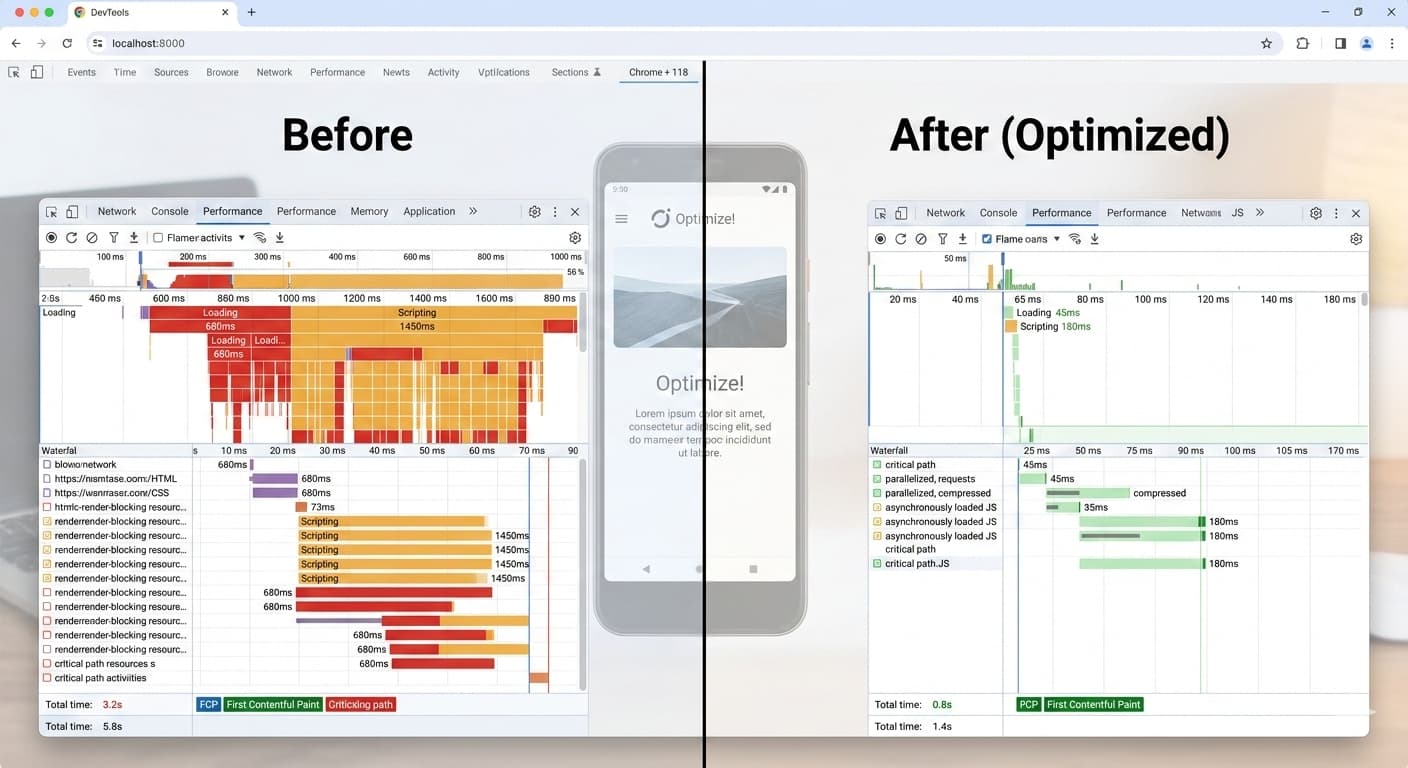
Figure: CRP timeline in Chrome DevTools - after optimization (right) shows significantly reduced blocking.
Action Steps: Your 5-Day CRP Optimization Plan
-
Audit your current CRP - Use Chrome DevTools (Performance tab) and Lighthouse to identify bottlenecks.
-
Optimize CSS delivery - Inline critical CSS and defer the rest (plugin or custom build).
-
Defer non-critical JavaScript - Add
async/deferattributes or use dynamic imports. -
Enable server-level compression & push - Gzip/Brotli, HTTP/2 push, or preload headers.
-
Test on real mobile devices - Use WebPageTest and field data (CrUX) to validate improvements.
📚 Official Documentation & Tools
EveryCentCounts Web Design Division
Our team has delivered 50+ mobile-first websites achieving 98%+ Google PageSpeed scores. We specialize in both WordPress optimization and custom website development for businesses generating $1M+ in annual revenue.
Disclaimer: The strategies discussed assume professional implementation and may require technical expertise. Results vary based on current website infrastructure and market conditions. WordPress plugin recommendations are based on 2026 performance benchmarks. Consult with our web design team at everycentcounts.net/book-an-appointment.php for customized solutions.
Ready to Implement These Strategies?
Book a free website audit with our web design experts to see how these best practices can transform your online presence.
Book Free Website Audit